> ## Documentation Index
> Fetch the complete documentation index at: https://cobalt-55-abhishek.mintlify.site/llms.txt
> Use this file to discover all available pages before exploring further.
# HTTP Node
The HTTP Node in Refold is designed to make HTTP requests to the APIs of the specific integration associated with the workflow. This node simplifies the workflow by allowing you to create direct HTTP requests.
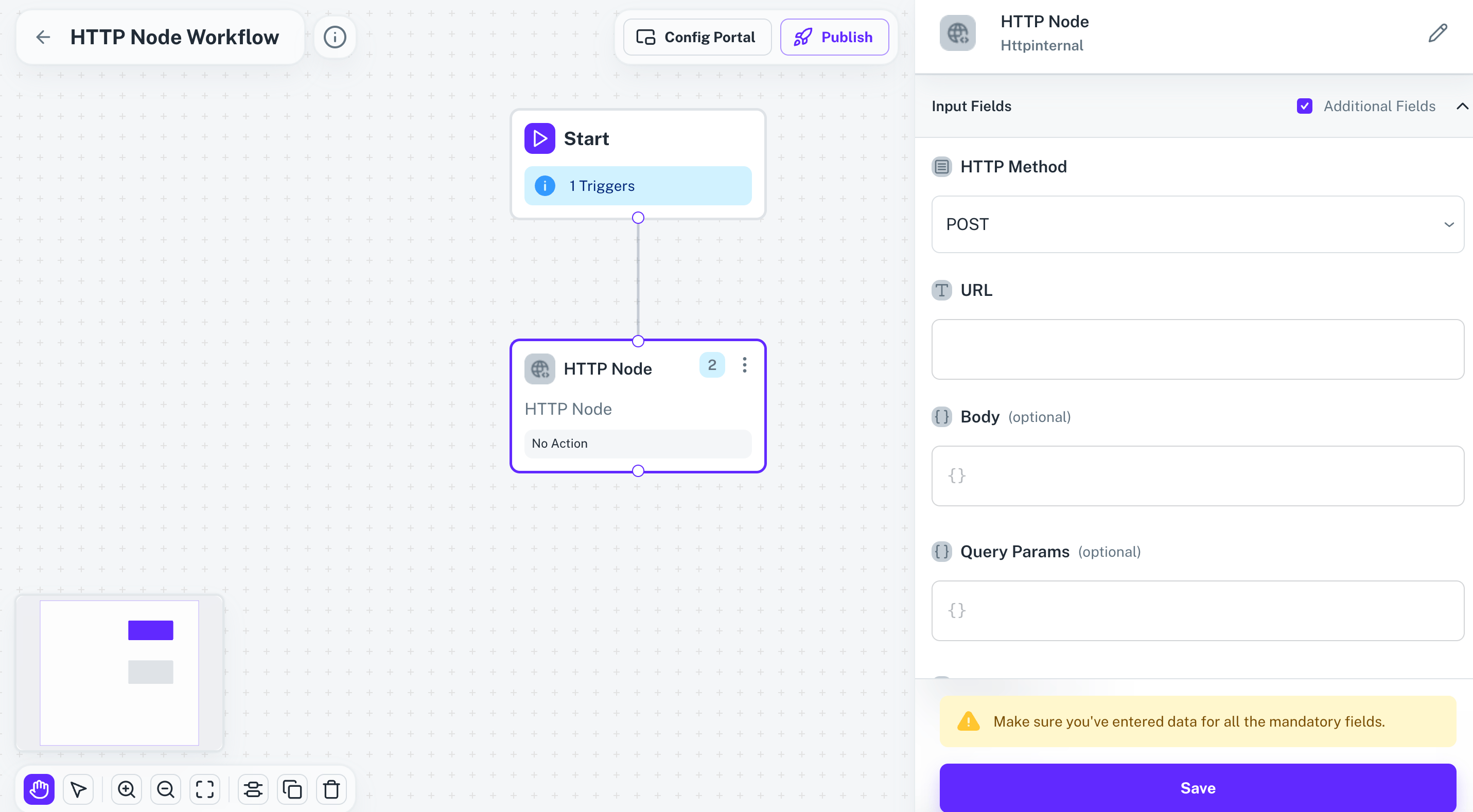 ## Steps to Use HTTP Node
The HTTP Node is configured to interact with the APIs of the integration that the workflow is based on. Here’s how to set up and use the HTTP Node:
In your workflow, drag and drop the HTTP Node from the list of available nodes.
Once the HTTP Node is added, configure the request details like `Method`, `URL`, `Body` etc. to match the API of the integration.
By utilizing the HTTP Node, users can efficiently manage API interactions within the scope of the integration.
## Steps to Use HTTP Node
The HTTP Node is configured to interact with the APIs of the integration that the workflow is based on. Here’s how to set up and use the HTTP Node:
In your workflow, drag and drop the HTTP Node from the list of available nodes.
Once the HTTP Node is added, configure the request details like `Method`, `URL`, `Body` etc. to match the API of the integration.
By utilizing the HTTP Node, users can efficiently manage API interactions within the scope of the integration.