> ## Documentation Index
> Fetch the complete documentation index at: https://cobalt-55-abhishek.mintlify.site/llms.txt
> Use this file to discover all available pages before exploring further.
# API Reference
> Programmatically manage linked accounts, trigger workflows, configure integrations, and automate operations in Refold.
The Refold API provides RESTful endpoints to manage your integration platform programmatically. You can create and manage linked accounts, trigger workflow executions, configure integrations, handle webhooks, manage persistent data, and interact with MCP servers.
All API requests use the base URL `https://app.refold.ai`. We've updated our domain to `app.refold.ai` from `app.refold.ai` — existing `app.refold.ai` requests will continue to work until it is decommissioned at a later date.
## Authentication
Refold supports two authentication methods. Which one applies depends on whether the endpoint is **org-level** or **linked-account-level**:
* **Org-level** endpoints (e.g. managing linked accounts, webhooks, variable definitions) use your **API key** only.
* **Linked-account-level** endpoints (e.g. configs, workflows, executions, MCP servers) operate in the context of one linked account — authenticate with your **API key + `linked_account_id`**, or with a **session token**.
Use API-key authentication for server-side operations where your key stays secure.
Your Refold API key.
The linked account to act on. Required for linked-account-level endpoints; omit it for org-level endpoints.
```bash theme={null}
curl -X GET https://app.refold.ai/api/v2/public/application \
-H "x-api-key: YOUR_API_KEY" \
-H "linked_account_id: YOUR_LINKED_ACCOUNT_ID"
```
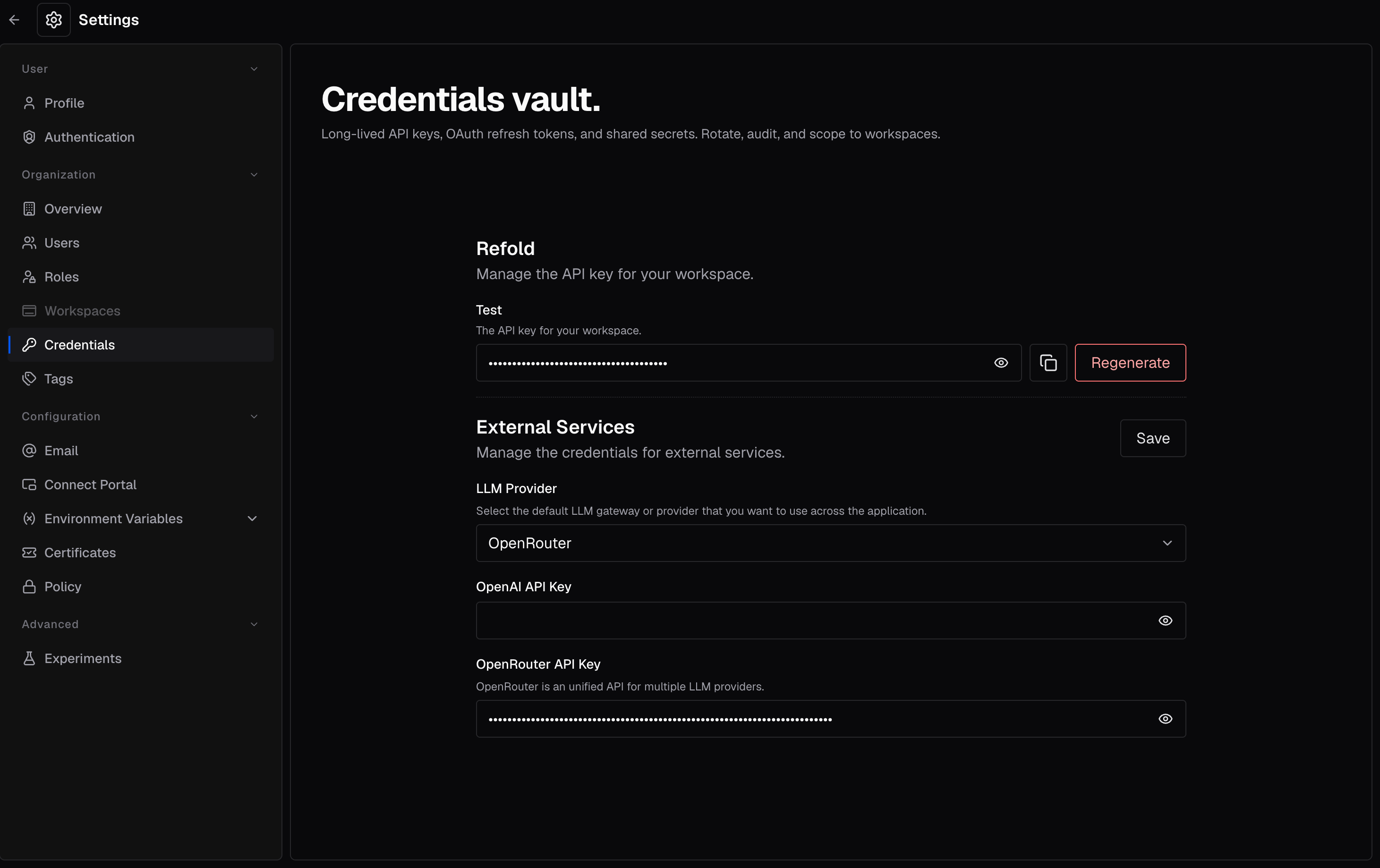
**Finding your API Key:**
Navigate to **Settings → Credentials** in your Refold dashboard. You can copy the API key for either the Test or Production environment.
 Use session-token authentication for frontend / hosted implementations where you cannot expose your API key. A session token is **scoped to a single linked account**, so it replaces both the `x-api-key` and `linked_account_id` headers.
Bearer token using your session token.
**Format:** `Bearer YOUR_SESSION_TOKEN`
```bash theme={null}
curl -X GET https://app.refold.ai/api/v2/public/workflow/enabled \
-H "Authorization: Bearer YOUR_SESSION_TOKEN"
```
**Where it applies:** linked-account-level endpoints — configs, config fields, workflows, executions, MCP servers, events, datastores, hosted Connect, and more. Because a session token represents one customer, it is **not** accepted for org-admin operations such as managing linked accounts, webhooks, or variable definitions.
Generate a session token with the [Generate Session Token](/legacy/api-reference/session-tokens/generate-session-token) endpoint.
## Rate Limits
The Refold API enforces rate limits to ensure fair usage across all users.
| Limit Type | Value |
| ------------- | ---------------------------------------- |
| Standard Rate | 20 requests per second |
| Burst Rate | 5 requests in an instant within a second |
When you exceed rate limits, the API returns a `429 Too Many Requests` response. Implement exponential backoff in your retry logic to handle rate limiting gracefully.
## API Resources
Create and manage end-users who connect their third-party accounts through your integration.
Discover the integrations enabled in your account and a linked account's connection status.
Inspect an app's auth fields and build OAuth authorization URLs.
Save key-based credentials and migrate existing auth onto an integration.
Issue scoped tokens for secure frontend authentication.
Generate hosted Connect URLs for end-user authentication flows.
Subscribe to real-time notifications when events occur in Refold.
Install and configure apps per linked account, and set field values.
Define custom events and fire them to start workflows.
Manage public (org/slug-level) and private (linked-account) workflows, then publish and execute them.
Retrieve details, status, and node output of workflow executions.
Run workflows on cron or interval triggers.
Manage named reference-data tables for a linked account.
Create API-managed tables, columns, and records.
Manage variable definitions and scoped values.
Expose integrations and chains as tools for AI agents.
Retrieve and submit public human-in-the-loop forms.
## Error Handling
The API returns standard HTTP status codes and a consistent error response shape:
```json theme={null}
{
"status_code": 401,
"http_error_type": "UNAUTHORIZED",
"error": "SERVER_ERROR",
"message": "Invalid Credentials"
}
```
Most services return the internal code in an `error` field; a few endpoints return it as `error_code` instead. Both carry the same meaning.
| Status Code | Description |
| ----------- | ------------------------------------------------------------ |
| `200` | Request succeeded |
| `400` | Bad request. Check your request parameters. |
| `401` | Authentication failed. Verify your API key or session token. |
| `404` | Resource not found |
| `429` | Rate limit exceeded. Implement backoff and retry. |
| `500` | Internal server error. Contact support if persistent. |
## What's Next
Set up your first end-user to start building integrations.
Learn how to execute workflows programmatically.
Use our Node.js, React, or JavaScript SDKs for faster development.
Use session-token authentication for frontend / hosted implementations where you cannot expose your API key. A session token is **scoped to a single linked account**, so it replaces both the `x-api-key` and `linked_account_id` headers.
Bearer token using your session token.
**Format:** `Bearer YOUR_SESSION_TOKEN`
```bash theme={null}
curl -X GET https://app.refold.ai/api/v2/public/workflow/enabled \
-H "Authorization: Bearer YOUR_SESSION_TOKEN"
```
**Where it applies:** linked-account-level endpoints — configs, config fields, workflows, executions, MCP servers, events, datastores, hosted Connect, and more. Because a session token represents one customer, it is **not** accepted for org-admin operations such as managing linked accounts, webhooks, or variable definitions.
Generate a session token with the [Generate Session Token](/legacy/api-reference/session-tokens/generate-session-token) endpoint.
## Rate Limits
The Refold API enforces rate limits to ensure fair usage across all users.
| Limit Type | Value |
| ------------- | ---------------------------------------- |
| Standard Rate | 20 requests per second |
| Burst Rate | 5 requests in an instant within a second |
When you exceed rate limits, the API returns a `429 Too Many Requests` response. Implement exponential backoff in your retry logic to handle rate limiting gracefully.
## API Resources
Create and manage end-users who connect their third-party accounts through your integration.
Discover the integrations enabled in your account and a linked account's connection status.
Inspect an app's auth fields and build OAuth authorization URLs.
Save key-based credentials and migrate existing auth onto an integration.
Issue scoped tokens for secure frontend authentication.
Generate hosted Connect URLs for end-user authentication flows.
Subscribe to real-time notifications when events occur in Refold.
Install and configure apps per linked account, and set field values.
Define custom events and fire them to start workflows.
Manage public (org/slug-level) and private (linked-account) workflows, then publish and execute them.
Retrieve details, status, and node output of workflow executions.
Run workflows on cron or interval triggers.
Manage named reference-data tables for a linked account.
Create API-managed tables, columns, and records.
Manage variable definitions and scoped values.
Expose integrations and chains as tools for AI agents.
Retrieve and submit public human-in-the-loop forms.
## Error Handling
The API returns standard HTTP status codes and a consistent error response shape:
```json theme={null}
{
"status_code": 401,
"http_error_type": "UNAUTHORIZED",
"error": "SERVER_ERROR",
"message": "Invalid Credentials"
}
```
Most services return the internal code in an `error` field; a few endpoints return it as `error_code` instead. Both carry the same meaning.
| Status Code | Description |
| ----------- | ------------------------------------------------------------ |
| `200` | Request succeeded |
| `400` | Bad request. Check your request parameters. |
| `401` | Authentication failed. Verify your API key or session token. |
| `404` | Resource not found |
| `429` | Rate limit exceeded. Implement backoff and retry. |
| `500` | Internal server error. Contact support if persistent. |
## What's Next
Set up your first end-user to start building integrations.
Learn how to execute workflows programmatically.
Use our Node.js, React, or JavaScript SDKs for faster development.